CLI Reference (dbterd)
Run dbterd --help or dbterd -h to see the basic guideline for CLI Reference.
Sample Datasets
The project includes several sample datasets in the samples/ directory that you can use to test and explore the CLI commands:
samples/jaffle-shop/: A simple dbt artifacts with customers, orders, and payments modelssamples/dbtresto/: A more complex artifacts with dimension and fact tables for analysissamples/dbt-constraints/: Demonstrates using constraints for relationshipssamples/facebookad/,samples/fivetranlog/,samples/shopify/: Additional sample artifacts
The examples below show how to use these sample datasets with dbterd commands.
Tools for producing diagram-as-code.
Options:
--version Show the version and exit.
-h, --help Show this message and exit.
Commands:
debug Inspect the hidden magics.
init Initialize a dbterd configuration file.
run Generate ERD file from reading dbt artifact files,...
run-metadata Generate ERD file from reading Discovery API (dbt Cloud).
Specify one of these sub-commands and you can find more help from there.
dbterd init
Command to initialize a dbterd configuration file with documented defaults and examples.
Creates .dbterd.yml in the current directory with all available configuration options. For more details on configuration files, see the Configuration Files Guide.
Examples:
Usage: dbterd init [OPTIONS]

Initialize a dbterd configuration file.

Creates .dbterd.yml with common parameters and helpful comments.
For pyproject.toml configuration, manually add [tool.dbterd] section.

Use --template to choose between dbt-core and dbt-cloud configurations.

Options:
  --template, -tmpl [dbt-core|dbt-cloud]
                              Configuration template type (dbt-core or dbt-
                              cloud)  [default: dbt-core]
  --force                     Overwrite existing configuration file if
                              present
  -h, --help                  Show this message and exit.
Configuration Files
Once you create a configuration file, all CLI arguments become optional. The config file provides defaults, and you can override any setting with CLI arguments. Learn more in the Configuration Files Guide.
dbterd run
Command to generate diagram-as-a-code file from dbt artifact files, optionally downloading from Administrative API (dbt Cloud).
Examples:
# Generate DBML ERD from jaffle-shop sample
dbterd run --artifacts-dir ./samples/jaffle-shop

# Generate Mermaid ERD from jaffle-shop sample
dbterd run --artifacts-dir ./samples/jaffle-shop --target mermaid

# Generate D2 ERD from dbtresto sample
dbterd run --artifacts-dir ./samples/dbtresto --target d2

# Generate GraphViz ERD without columns
dbterd run --artifacts-dir ./samples/dbtresto --target graphviz --omit-columns
Usage: dbterd run [OPTIONS]

Generate ERD file from reading dbt artifact files, optionally downloading
from Administrative API (dbt Cloud) before hands.

Options:
  -s, --select TEXT               Selection criteria
  -ns, --exclude TEXT             Exclusion criteria
  -t, --target TEXT               Target to the diagram-as-code platform
                                  [default: dbml]
  -rt, --resource-type TEXT       Specified dbt resource type(model,
                                  source), default:model, use examples,
                                  -rt model -rt source
  -a, --algo TEXT                 Specified algorithm in the way to detect
                                  diagram connectors  [default:
                                  test_relationship]
  -enf, --entity-name-format TEXT
                                  Specified the format of the entity node's
                                  name  [default: resource.package.model]
  --omit-entity-name-quotes       Flag to omit double quotes in the entity
                                  name. Currently only dbml is supported
  -o, --output TEXT               Output the result file. Default to the
                                  cwd/target
  -ofn, --output-file-name TEXT   Output the result file name. Default is
                                  defined in the target module
  --omit-columns                  Flag to omit columns in diagram. Currently
                                  only mermaid is supported
  -eg, --entity-group TEXT        Group entities by dot-separated Table
                                  attribute names (e.g. 'database.schema').
                                  [default: ""]
  -ad, --artifacts-dir TEXT       Specified the path to dbt artifact directory
                                  which known as /target directory
  -mv, --manifest-version TEXT    Specified dbt manifest.json version
  -cv, --catalog-version TEXT     Specified dbt catalog.json version
  --relax-policies TEXT           Comma-separated parser relaxation policy
                                  names applied when reading artifacts. Omit
                                  to apply all policies; pass an empty value
                                  for strict validation.
  --dbt                           Flag to indicate the Selection to follow
                                  dbt's one leveraging Programmatic Invocation
  -dpd, --dbt-project-dir TEXT    Specified dbt project directory path
  -dt, --dbt-target TEXT          Specified dbt target name
  --dbt-auto-artifacts            Flag to force generating dbt artifact files
                                  leveraging Programmatic Invocation
  --dbt-cloud                     Flag to download dbt artifact files using
                                  dbt Cloud API. This requires the additional
                                  parameters to be able to connection to dbt
                                  Cloud API
  --dbt-cloud-host-url TEXT       Configure dbt Cloud's Host URL. Try to get
                                  OS environment variable
                                  (DBTERD_DBT_CLOUD_HOST_URL) if not
                                  specified. Sample dbt Cloud Run URL: https:/
                                  /<HOST_URL>/deploy/<ACCOUNT_ID>/projects/irr
                                  elevant/runs/<RUN_ID>  [default:
                                  cloud.getdbt.com]
  --dbt-cloud-account-id TEXT     Configure dbt Cloud's Account ID. Try to get
                                  OS environment variable
                                  (DBTERD_DBT_CLOUD_ACCOUNT_ID) if not
                                  specified
  --dbt-cloud-run-id TEXT         Configure dbt Cloud's completed Run ID. Try
                                  to get OS environment variable
                                  (DBTERD_DBT_CLOUD_RUN_ID) if not specified
  --dbt-cloud-job-id TEXT         Configure dbt Cloud's Job ID. Try to get OS
                                  environment variable
                                  (DBTERD_DBT_CLOUD_JOB_ID) if not specified
  --dbt-cloud-service-token TEXT  Configure dbt Service Token (Permissions:
                                  Job Admin). Try to get OS environment
                                  variable (DBTERD_DBT_CLOUD_SERVICE_TOKEN) if
                                  not specified. Visit
                                  https://docs.getdbt.com/docs/dbt-cloud-
                                  apis/service-tokens to see how to generate
                                  it.
  --dbt-cloud-api-version TEXT    Configure dbt Cloud Administrative API
                                  version. Try to get OS environment variable
                                  (DBTERD_DBT_CLOUD_API_VERSION) if not
                                  specified.  [default: v2]
  -h, --help                      Show this message and exit.
dbterd run --select (-s)
Selection criteria.
Selects all dbt models if not specified, supports multiple options
Rules:
- By
name: model name starts with input string - By
exact: exact model name, formed asexact:model.package.name - By
schema: schema name starts with an input string, formed asschema:<your_schema_name> - By
wildcard: model name matches to a wildcard pattern, formed aswildcard:<your_wildcard> - By
exposure: exposure name, exact match
Examples:
AND and OR logic
ANDlogic is applied to a single selection split by comma (,)ORlogic is applied to 2+ selection
Examples:
dbterd run --exclude (-ns)
Exclusion criteria. Rules are the same as Selection Criteria.
Does not exclude any dbt models if not specified, supports multiple options
Examples:
dbterd run --artifacts-dir (-ad)
Configure the path to directory containing dbt artifact files.
It will take the nested /target directory of --dbt-project-dir if not specified.
Default to the current directory's
/targetif both this option and--dbt-project-diroption are not specified
Examples:
dbterd run --output (-o)
Configure the path to directory containing the output diagram file.
Default to
./target
Examples:
dbterd run --output-file-name (-ofn)
Configure the output file name
Default to
output.{modulename}which is defined in the target module
Examples:
dbterd run --target (-t)
Default to
dbml
Supported target, please visit Generate the Targets
Examples:
# Generate DBML output for jaffle-shop
dbterd run --artifacts-dir ./samples/jaffle-shop -t dbml

# Generate Mermaid ERD for dbtresto
dbterd run --artifacts-dir ./samples/dbtresto -t mermaid

# Generate D2 diagram for dbtresto
dbterd run --artifacts-dir ./samples/dbtresto -t d2

# Generate GraphViz output for jaffle-shop
dbterd run --artifacts-dir ./samples/jaffle-shop -t graphviz
dbterd run --algo (-a)
Specified algorithm for detecting diagram connectors
Check the docs 📖
Supported ones:
test_relationship: Looking for all relationship tests to understand the ERssemantic: Looking for all semantic models' entities (primary & foreign) to understand the ERsmodel_contract: Looking for allforeign_keyconstraints in model contracts (manifest v12+ / dbt 1.9+) to understand the ERs
In the advanced use case of test_relationship, the test name can be configurable by following syntax:
{algorithm_name}:(name:{contains_test_name}|c_from:{referencing_column_name}|c_to:{referenced_column_name})
In the above:
algorithm_name(Mandatory):test_relationshiporsemanticcontains_test_name: Configure the test name (detected withcontainslogic). Default torelationshipc_from: Configure the test metadata attribute (1) for the foreign key column name(s). If (1)'s value is multiple columns, it will concat them all with_andwording > NOTE: It always looking at thecolumn_nameattribute firstlyc_to: Configure the test metadata attribute (2) for the referenced column name(s). If (2)'s value is multiple columns, it will concat them all with_andwording. Default tofield
For example, if you would use dbt-constraints package
The dbt-constraints package is using different name of test which is close to the constraint names, in this case, you would need to customize the input string here:
Examples:
dbterd run --omit-columns
Flag to omit columns in diagram. Currently only mermaid is supported
Default to
False
Examples:
dbterd run --manifest-version (-mv)
Specified dbt manifest.json version
Auto detect if not specified
Examples:
dbterd run --catalog-version (-cv)
Specified dbt catalog.json version
Auto detect if not specified
Examples:
dbterd run --relax-policies
Comma-separated list of parser relaxation policy names applied when reading dbt artifacts. This lets newer dbt versions — which introduce fields or enum values not yet supported by the artifact-parser library — still be parsed (for example, dbt 1.11 keeps the manifest at version 12 but adds a config property to macro nodes and a javascript value to supported_languages).
Available policies:
relax_extra_fields— ignore unknown fields instead of rejecting them.relax_enum_values— accept unknown enum values (widening non-typeenum fields to strings).
Omit the option to apply all policies (the default — keeps things working out of the box). Pass an empty value (
--relax-policies ""orrelax-policies: []in config) for strict validation.
When to use this option
You might encounter Pydantic validation errors like "Error: Could not open file 'catalog.json': File catalog.json is corrupted, please rebuild" when using artifact files from newer dbt versions. The default (all policies) works around these automatically. Narrow the list if you want to relax only specific aspects, or go strict to surface schema drift. Any unsupported fields won't appear in the generated ERD (usually fine since relationship information remains intact).
Examples:
dbterd run --resource-type (-rt)
Specified dbt resource type(model, source).
Default to
["model"], supports multiple options
Examples:
# Generate ERD for sources only
dbterd run -rt source -t mermaid

# For proper table separation in source ERDs, combine with --entity-name-format
dbterd run -rt source -t mermaid -enf resource.package.table

# Include both models and sources in the same diagram
dbterd run -rt model -rt source -enf database.schema.table
Source table naming
When working with sources, it's recommended to use --entity-name-format with formats that include the table name (e.g., resource.package.table or database.schema.table) to ensure each source table appears as a distinct node. See the --entity-name-format section for more details.
dbterd run --dbt
Flag to indicate the Selection to follow dbt's one leveraging Programmatic Invocation
Default to
False
Examples:
dbterd run --dbt --dbt-auto-artifact
Flag to indicate force running dbt docs generate to the targeted project in order to produce the dbt artifact files.
This option has to be enabled together with --dbt option, and will override the value of --artifacts-dir to use the /target dir of the value of --dbt-project-dir.
Default to
False
Examples:
dbterd run --dbt-project-dir (-dpd)
Specified dbt project directory path
You should specify this option if your CWD is not the dbt project dir, and normally used with --dbt enabled. It will take the value of --artifacts-dir if not specified.
Default to the current directory if both this option and
--artifacts-diroption are not specified
Examples:
dbterd run --dbt-target (-dt)
Specified dbt target name
Probably used with --dbt enabled.
Default to the dbt's profile configuration
Examples:
dbterd run --entity-name-format (-enf)
Decide how the table name is generated on the ERD.
By default, the table name is the dbt node name (resource_type.package_name.model_name).
Currently, it supports the following keys in the format:
resource.package.model(by default)database.schema.table- Or any other partial forms e.g.
schema.table,resource.model
Working with Sources
When generating ERDs for sources (using -rt source), you may encounter an issue where the source node name doesn't include the table name, resulting in all tables from the same source appearing as a single node with circular relationships.
Solution: Use one of these entity name formats to ensure proper table-level separation:
resource.package.table- Shows resource type, package, and table nameresource.package.model.table- Shows resource type, package, model (source name), and table namedatabase.schema.table- Shows the fully qualified physical table name
For example:
# This will properly separate source tables
dbterd run -t mermaid -rt source -enf resource.package.table

# This will also work and include the source name
dbterd run -t mermaid -rt source -enf resource.package.model.table
Note: dbterd doesn't yet have native support for extracting the source name independently, but these workarounds ensure each source table appears as its own distinct node in the diagram.
Examples:
dbterd run --omit-entity-name-quotes
Flag to omit the double quotes in the generated entity name. Currently only dbml is supported.
Default to
False
Enabled it to allow dbdocs to recognize the schemas and display them as grouping:
- With quotes:
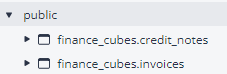
- Without quotes:
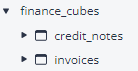
⚠️ As of 2024 June: DBML doesn't support nested schema in the entity name which means 'database.schema.table' won't be allowed, but 'schema.table' does!
Examples:
dbterd run --entity-group (-eg)
Group entities by Table attributes. Supported on the dbml and json targets — each renders the grouping in its own idiom, so the same flag value works on either.
Default to `` (empty, the feature is off)
The value is a dot-separated list of Table attribute names. Each table's group key is built by joining those attribute values with ., so database.schema puts every table that shares the same database and schema into one group. Other useful attributes include schema, database, and resource_type.
For the dbml target, a //TableGroups section is appended after the tables and refs:
For the json target, an optional groups array is added to the payload, with each group exposing its name (the joined key) and the node_ids it contains — matching the id of each node so consumers can wire them up without guesswork:
{
  "groups": [
    {
      "name": "demo.public",
      "node_ids": ["model.demo.customers", "model.demo.orders"]
    }
  ]
}
It plays nicely with --entity-name-format: the DBML group members reuse whatever table names the format produces, so the references always resolve.
Examples:
dbterd run --with-dependencies (-wd)
Emit the dbt DAG as DBML Dep blocks, so the ERD carries data lineage alongside the entity relationships. Supported on the dbml target.
Default to
false
Relationships (Ref) come from dbt relationship tests and describe how entities join. Dependencies (Dep) come from the dbt DAG and describe how entities are built. They answer different questions, and this flag adds the second without touching the first.
//Deps (based on the DBT DAG)
Dep {
  "source.jaffle_shop.raw_orders" -> "model.jaffle_shop.stg_orders"
}
Dep {
  "model.jaffle_shop.stg_orders" -> "model.jaffle_shop.orders"
  "model.jaffle_shop.order_items" -> "model.jaffle_shop.orders"
}
DBML requires every edge inside one Dep block to share the same downstream table, so one block is emitted per downstream entity, holding all of that entity's upstreams. A table can appear as an upstream in as many blocks as it has children.
Dependencies stay connected across a selection. When --select or --exclude drops the nodes in between, the walk continues through them to the nearest ancestors that are selected. Select your marts and your sources without the staging layer, and each mart still points at the sources it is built from. With no selection applied there is nothing to walk through, so the output is exactly the literal dbt DAG.
That also keeps the file valid: DBML rejects a Dep pointing at a Table the file does not declare, which makes the whole document unparseable. Because the walk can only ever terminate on a selected node, every endpoint is an entity the ERD actually declares.
To see sources in the lineage, include them with --resource-type. Note that under the default --entity-name-format of resource.package.model, every table of one dbt source collapses onto a single entity name, so pair -rt source with a format that keeps them distinct, such as resource.package.table.
Examples:
dbterd run --dbt-cloud
Decide to download artifact files from dbt Cloud Job Run instead of compiling locally.
Check Download artifacts from a Job Run for more details.
Examples:
dbterd run-metadata
Command to generate diagram-as-a-code file by connecting to dbt Cloud Discovery API using GraphQL connection.
Check this guideline for more details.
Examples:
# Generate DBML ERD from dbt Cloud environment
dbterd run-metadata --dbt-cloud-environment-id 123456 --dbt-cloud-service-token your_token

# Generate Mermaid ERD from dbt Cloud with specific models
dbterd run-metadata --target mermaid --select model.project.customers --dbt-cloud-environment-id 123456

# Generate D2 ERD with custom query file
dbterd run-metadata --target d2 --dbt-cloud-environment-id 123456 --dbt-cloud-query-file-path ./my_query.gql
Usage: dbterd run-metadata [OPTIONS]

Generate ERD file from reading Discovery API (dbt Cloud).

Options:
  -s, --select TEXT               Selection criteria
  -ns, --exclude TEXT             Exclusion criteria
  -t, --target TEXT               Target to the diagram-as-code platform
                                  [default: dbml]
  -rt, --resource-type TEXT       Specified dbt resource type(model,
                                  source), default:model, use examples,
                                  -rt model -rt source
  -a, --algo TEXT                 Specified algorithm in the way to detect
                                  diagram connectors  [default:
                                  test_relationship]
  -enf, --entity-name-format TEXT
                                  Specified the format of the entity node's
                                  name  [default: resource.package.model]
  --omit-entity-name-quotes       Flag to omit double quotes in the entity
                                  name. Currently only dbml is supported
  -o, --output TEXT               Output the result file. Default to the
                                  cwd/target
  -ofn, --output-file-name TEXT   Output the result file name. Default is
                                  defined in the target module
  --omit-columns                  Flag to omit columns in diagram. Currently
                                  only mermaid is supported
  -eg, --entity-group TEXT        Group entities by dot-separated Table
                                  attribute names (e.g. 'database.schema').
                                  [default: ""]
  --dbt-cloud-host-url TEXT       Configure dbt Cloud's Host URL. Try to get
                                  OS environment variable
                                  (DBTERD_DBT_CLOUD_HOST_URL) if not
                                  specified. Sample dbt Cloud Run URL: https:/
                                  /<HOST_URL>/deploy/<ACCOUNT_ID>/projects/irr
                                  elevant/runs/<RUN_ID>  [default:
                                  cloud.getdbt.com]
  --dbt-cloud-service-token TEXT  Configure dbt Service Token (Permissions:
                                  Job Admin). Try to get OS environment
                                  variable (DBTERD_DBT_CLOUD_SERVICE_TOKEN) if
                                  not specified. Visit
                                  https://docs.getdbt.com/docs/dbt-cloud-
                                  apis/service-tokens to see how to generate
                                  it.
  --dbt-cloud-environment-id TEXT
                                  Configure dbt Cloud Environment ID - Used
                                  for Metadata (Discovery) API. Try to get OS
                                  environment variable
                                  (DBTERD_DBT_CLOUD_ENVIRONMENT_ID) if not
                                  specified.
  --dbt-cloud-query-file-path TEXT
                                  Configure dbt Cloud GraphQL query file path
                                  - Used for Metadata (Discovery) API. Try to
                                  get OS environment variable
                                  (DBTERD_DBT_CLOUD_QUERY_FILE_PATH) if not
                                  specified.
  -h, --help                      Show this message and exit.
dbterd debug
Shows hidden configured values, which will help us to see what configs are passed into and how they are evaluated to be used.
Examples:
2023-09-08 16:43:45,066 - dbterd - INFO - Run with dbterd==1.0.0 (main.py:54)
2023-09-08 16:43:45,071 - dbterd - INFO - **Arguments used** (main.py:63)
2023-09-08 16:43:45,073 - dbterd - DEBUG - {
    "artifacts_dir": "",
    "output": "C:\\Users\\DAT\\Documents\\Sources\\dbterd\\target",
    "select": [],
    "exclude": [],
    "target": "dbml",
    "algo": "test_relationship",
    "manifest_version": null,
    "catalog_version": null,
    "resource_type": [
        "model"
    ],
    "dbt": false,
    "dbt_project_dir": "",
    "dbt_target": null
} (main.py:64)
2023-09-08 16:43:45,079 - dbterd - INFO - **Arguments evaluated** (main.py:65)
2023-09-08 16:43:45,081 - dbterd - INFO - Using dbt artifact dir at: C:\Users\DAT\Documents\Sources\dbterd\target (base.py:41)
2023-09-08 16:43:45,082 - dbterd - INFO - Using dbt project  dir at: C:\Users\DAT\Documents\Sources\dbterd (base.py:42)
2023-09-08 16:43:45,084 - dbterd - DEBUG - {
    "artifacts_dir": "C:\\Users\\DAT\\Documents\\Sources\\dbterd\\target",
    "output": "C:\\Users\\DAT\\Documents\\Sources\\dbterd\\target",
    "select": [],
    "exclude": [],
    "target": "dbml",
    "algo": "test_relationship",
    "manifest_version": null,
    "catalog_version": null,
    "resource_type": [
        "model"
    ],
    "dbt": false,
    "dbt_project_dir": "C:\\Users\\DAT\\Documents\\Sources\\dbterd",
    "dbt_target": null
} (main.py:66)
Usage: dbterd debug [OPTIONS]

Inspect the hidden magics.

Options:
  -s, --select TEXT               Selection criteria
  -ns, --exclude TEXT             Exclusion criteria
  -t, --target TEXT               Target to the diagram-as-code platform
                                  [default: dbml]
  -rt, --resource-type TEXT       Specified dbt resource type(model,
                                  source), default:model, use examples,
                                  -rt model -rt source
  -a, --algo TEXT                 Specified algorithm in the way to detect
                                  diagram connectors  [default:
                                  test_relationship]
  -enf, --entity-name-format TEXT
                                  Specified the format of the entity node's
                                  name  [default: resource.package.model]
  --omit-entity-name-quotes       Flag to omit double quotes in the entity
                                  name. Currently only dbml is supported
  -o, --output TEXT               Output the result file. Default to the
                                  cwd/target
  -ofn, --output-file-name TEXT   Output the result file name. Default is
                                  defined in the target module
  --omit-columns                  Flag to omit columns in diagram. Currently
                                  only mermaid is supported
  -eg, --entity-group TEXT        Group entities by dot-separated Table
                                  attribute names (e.g. 'database.schema').
                                  [default: ""]
  -ad, --artifacts-dir TEXT       Specified the path to dbt artifact directory
                                  which known as /target directory
  -mv, --manifest-version TEXT    Specified dbt manifest.json version
  -cv, --catalog-version TEXT     Specified dbt catalog.json version
  --relax-policies TEXT           Comma-separated parser relaxation policy
                                  names applied when reading artifacts. Omit
                                  to apply all policies; pass an empty value
                                  for strict validation.
  --dbt                           Flag to indicate the Selection to follow
                                  dbt's one leveraging Programmatic Invocation
  -dpd, --dbt-project-dir TEXT    Specified dbt project directory path
  -dt, --dbt-target TEXT          Specified dbt target name
  --dbt-auto-artifacts            Flag to force generating dbt artifact files
                                  leveraging Programmatic Invocation
  --dbt-cloud                     Flag to download dbt artifact files using
                                  dbt Cloud API. This requires the additional
                                  parameters to be able to connection to dbt
                                  Cloud API
  --dbt-cloud-host-url TEXT       Configure dbt Cloud's Host URL. Try to get
                                  OS environment variable
                                  (DBTERD_DBT_CLOUD_HOST_URL) if not
                                  specified. Sample dbt Cloud Run URL: https:/
                                  /<HOST_URL>/deploy/<ACCOUNT_ID>/projects/irr
                                  elevant/runs/<RUN_ID>  [default:
                                  cloud.getdbt.com]
  --dbt-cloud-account-id TEXT     Configure dbt Cloud's Account ID. Try to get
                                  OS environment variable
                                  (DBTERD_DBT_CLOUD_ACCOUNT_ID) if not
                                  specified
  --dbt-cloud-run-id TEXT         Configure dbt Cloud's completed Run ID. Try
                                  to get OS environment variable
                                  (DBTERD_DBT_CLOUD_RUN_ID) if not specified
  --dbt-cloud-job-id TEXT         Configure dbt Cloud's Job ID. Try to get OS
                                  environment variable
                                  (DBTERD_DBT_CLOUD_JOB_ID) if not specified
  --dbt-cloud-service-token TEXT  Configure dbt Service Token (Permissions:
                                  Job Admin). Try to get OS environment
                                  variable (DBTERD_DBT_CLOUD_SERVICE_TOKEN) if
                                  not specified. Visit
                                  https://docs.getdbt.com/docs/dbt-cloud-
                                  apis/service-tokens to see how to generate
                                  it.
  --dbt-cloud-api-version TEXT    Configure dbt Cloud Administrative API
                                  version. Try to get OS environment variable
                                  (DBTERD_DBT_CLOUD_API_VERSION) if not
                                  specified.  [default: v2]
  --dbt-cloud-environment-id TEXT
                                  Configure dbt Cloud Environment ID - Used
                                  for Metadata (Discovery) API. Try to get OS
                                  environment variable
                                  (DBTERD_DBT_CLOUD_ENVIRONMENT_ID) if not
                                  specified.
  --dbt-cloud-query-file-path TEXT
                                  Configure dbt Cloud GraphQL query file path
                                  - Used for Metadata (Discovery) API. Try to
                                  get OS environment variable
                                  (DBTERD_DBT_CLOUD_QUERY_FILE_PATH) if not
                                  specified.
  -h, --help                      Show this message and exit.